Wrist Watch – why settle for only one wrist?
May 20th, 2009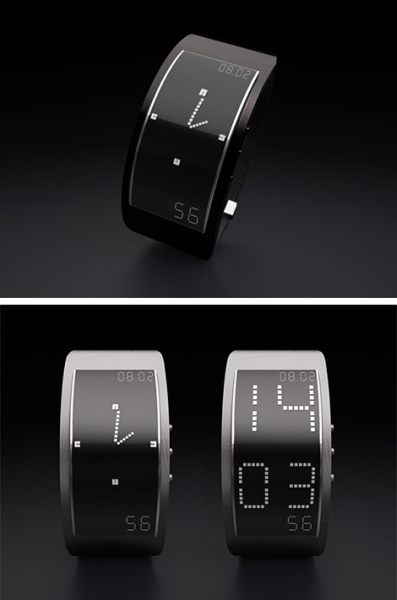 I have to confess, I wear a wrist watch perhaps once .. (wait for it) .. every two years. At least that’s my best estimate over the last 6 years or so. I use my blackberry exclusively for my time-telling needs (and all the appliances that tell time – my computer, microwave, cable box, tv, alarm clock, etc). So you could say I’m the last person to have any sort of useful input on the subject of wrist accessories. But after seeing this image on the right, I had an idea (assuming the watch on the right doesn’t already do what I’m proposing here – I don’t know the manufacturer unfortunately, so can’t check). What if wrist watches came in pairs? Think about it – that way you don’t have to wear a bracelet on the hand opposite the one you wear a watch on. That way you have twice the room to accessorize and you don’t have to go through all that “my accessories have to match” hooplah.
The example on the right seems to suggest keeping an analog version of time on one hand and a digital version on the other. That would indeed be interesting – if you’re righty, keep your digital time on your left hand so you can use your good hand while looking at your bad hand. If you’re being artistic with your left hand, use the analog time on the right.
But here’s an even better idea – instead of trying to cram the time, the date, the year, the day of the week and all the other features onto one display – separate them onto different wrists. This also opens the wrist watch up for use as a cell phone. Set the right half to be the earpiece, and the left to be the microphone. The reason regular wrist watches can’t be used like this is because they’re just not big enough (and you don’t want them to be that big honestly) to both be the microphone and the earpiece. But this way, hold your right wrist up to your ear – you’re doing that in any case with your cellphone. Whenever you want to say something, hold your left wrist to your mouth and say what you need to say. Have the two halves connect via bluetooth. Add accelerometers or something else that’ll let the phones know which one is where, and if your right arm gets tired, switch and hold up the left wrist to your left ear, and that half becomes the earpiece (and vice versa).
Of course, as an engineer, I also can’t help but think of the value of redundancy. You lose one half of your two-part wrist watch – have a button that switches function on the other side so you can always see your digits. The optimist can also say “wow, there’s less of a chance I’ll forget to put on at least one of the watches”. The pessimist of course will say “its just as likely for me to forget to put on both halves of this watch”.
So who’s gonna work with me to develop this idea? While I’d love to see this in a Rolex or a Breitling, Omega, TAG Heuer or whatever your favorite luxury watch brand is – I think its way more likely that a more technology-oriented brand like Seiko or Casio would probably be more up to this sort of exercise. Actually, I wouldn’t mind an Ed Hardy branded two-part watch, I might actually wear something like that. Or perhaps a nice Nokia watch that doubles as a phone, I’ve already seen some idea sketches for a watch-phone with a separate earpiece.
Am I totally off base here? Anybody else think this might be a good idea?
 Last night on NY1 I heard about some new stats released by the NYPD. This morning I read the
  I’m currently working on a project that happens to need a JavaScript and a PHP implementation of the Excel PMT function. I won’t bore you with the details (but ask if you’re intrigued), but it has to do with Loan Modifications that are all the rage nowadays thanks to Obama Administration initiatives that will hopefully help Americans save their mortgages, prevent foreclosures, support real estate prices and generally speaking save the world from sure doom.
 I just got pointed to